Category Archives: linkety-link

18
May

A (pen) Quiver for your Moleskine notebook

Despite the overwhelmingly digital nature of my life these days, I am still in love with paper and pens. Granted, I don’t get to use them as often as I used to when I was in school but I still enjoy a well-balanced pen that writes smoothly and crisply and a fresh pad of paper. To satisfy this need, I have a Moleskine notebook and a Pilot Hi-Tec-C pen and I try to keep them close to me wherever I go to jot down quick notes and thoughts. However, keeping a pen with that notebook has always proven to be harder than I thought, at least until now.

I came across the Quiver, a product by Quiver Global thanks to The Gadgeteer. It’s an elastic and leather contraption that attaches to a hardcover notebook and holds a pen or two for you. The single-pen version slips over the spine of your notebook and the double-pen version slips over the front cover. Though I only wanted a single-pen holder, I didn’t want that version interfering with my ability to keep the notebook open and write in it, so I opted for the double-pen version since that slides on over the front cover instead of the spine.

The picture above shows what it looks like on my 5-inch by 8.25-inch Moleskine notebook (a Le Petit Prince limited edition version that I purchased through Amazon).

I find that it works very well and doesn’t interfere much at all with my ability to write in the notebook. I use my notebook to jot down to do lists, outline projects and sometimes a little poem or bit of prose here and there. When I leave the house, the notebook almost always goes with me if I’m carrying a messenger bag and/or my laptop.

You can order the Quiver from Amazon here or directly from the company’s own online store here. Feel free to send me a message if you have any questions at all about it.

The version of the Quiver I have fits notebooks with covers between 8 inches and 9.25 inches tall. It does not fit the Morris Lessmore Dodocase for the iPad that I reviewed recently, in case you were wondering (its cover is 10 inches tall).

Given how little I use pens these days, my pen collection is very lackluster at the moment. However, I do have a unique stainless steel pen with a neat holder and a Hi Tec C cartridge heading my way eventually thanks to Kickstarter. I backed the Pen Type-A back in September and they’ve been having trouble with fabrication so delivery is taking far longer than expected (which seems to be normal for every Kickstarter project I’ve backed to date) but I’m looking forward to receiving that. I’ll definitely post about that when I receive it since it’s a unique item not yet available anywhere else.

10
Apr

SGP Steinheil Ultra Fine screen protector for the iPad 3

SGP Steinheil Ultra Fine screen protector for the iPad 3

I’ve been using my new iPad without a screen protector since I received it and I have now officially reached my breaking point with the fingerprints it accumulates. I put screen protectors on my last two iPads but thought I’d see what it was like without one this time around but I’ve had all I can stands and I can’t stands no more, in the immortal words of Popeye.

I don’t know how you non-screen-protector-using folks deal with the constant fingerprints. Even if I wipe it down every day I use it, it’s still too much. My OCD tendencies must be too great to cope with a naked iPad screen.

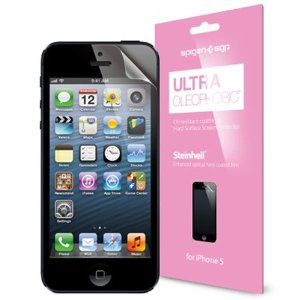
So, as with my iPhone 4S, I ordered an SGP Steinheil Ultra Fine screen protector for it, which arrived today. I’ve installed it and it’s every bit as fantastic as the version on my iPhone 4S. If you’re looking for an anti-glare screen protector, I definitely recommend this one. You can find it on Amazon here.

(SGP also makes an Ultra Optics version which I had for the iPad 2. I prefer the Ultra Fine version over that one, in case you’re choosing between the two. The Ultra Optics version may offer a tiny bit more clarity but it has a noticeable texture under your finger compared to the Ultra Fine version. Also, the Ultra Optics version collects fingerprints a little more than the Ultra Fine version, though it’s not nearly as bad as a naked screen, of course.)

19
Mar

Walking while working: my treadmill desk set-up

I first heard of treadmill desks a few years ago through a feature segment on a news program and was immediately intrigued by the idea. I was, and have always been, concerned about my health (and waistline) as I get older and worried about the sedentary nature of my job – spending a lot of time sitting at a computer (gym membership and volleyball leagues notwithstanding) does nothing to help me keep my girlish figure. This, combined with the fact that I love french fries, made me determined to get a treadmill desk at some point in the future.

Fast-forward several years to the present when I now have a job where a treadmill desk would be ideal since I work from home and though I love my Aeron chair, I finally had the time and resources to put together my ideal treadmill desk set-up. Read on for the details about the design process and my now-complete set-up.

15
Mar

Deal alert: 50% off Incase headphones

I subscribe to local deal alerts from LivingSocial and Groupon, two of the largest and most well-known deal-of-the-day services in the U.S. This morning, a deal from LivingSocial caught my eye and I thought it may be of interest to you as well if you come to my site for gadget-related information. Today, LivingSocial is offering up to 54% off Incase headphones, bringing the price of the company’s most expensive model, the Sonic headphones, down to just $72 (with free shipping) from $149.95.

Incase entered the headphone market last year, a surprising move to me given their focus on bags and other small accessories to date. However, their headphones are decent according to the reviews I’ve read (you can read one at iLounge here and one at Cut of Mac here) and all of them include an inline microphone and remote control (with volume buttons) that work with the iPhone and portable Macs.

Here’s what the LivingSocial deal offers:

  • $32 for the Pivot headphones (regularly priced at $59.95)
  • $42 for the Reflex headphones (regularly priced at $79.95)
  • $72 for the Sonic headphones (regularly priced at $149.95)
Free shipping is included (Incase normally charges between $5 and $12 to ship items within the U.S.).
Incase Sonic Headphones in black

Incase Sonic headphones, image courtesy of Incase

This deal will be available for 4 more days, making its end date March 19 (I’m not sure of the exact time). You can see the deal and purchase it here. Though I’m not exactly in the market for a new pair of headphones, I couldn’t pass this up and purchased the Sonic model.

In case you’re not familiar with how LivingSocial and Groupon work, you make your purchase and then you’ll receive a voucher via email, which is usually also accessible through the respective iOS apps each company offers, with additional details on how to redeem your purchase. When I’ve purchased physical products through these companies before, the voucher usually contains a coupon code that can be used to order directly from the offering company’s website.

I hope this is useful to you! Please be sure to read the fine print and terms and conditions and know that I’m not affiliated with Living Social or responsible should anything go awry or not meet your expectations.

13
Mar

To buy: DODOcase Morris Lessmore case for the iPad 3

I preordered an iPad 3 (a process that took me a couple of hours thanks to the overwhelming traffic Apple’s online store received after the close of the announcement event) and have been thinking, as always, about the accessories I’ll get for it. While a screen protector is certainly on my list, I’m also thinking that I’ll go back to DODOcase for a case this time after trying out the offerings from Portenzo and Treegloo for previous iPads.

I’ve almost always chosen plain black cases for my iPad since I don’t want to draw attention to it when I’m out and about. However, DODOcase has a hardcover case made in partnership with Moonbot Studios in honor of the Oscar-winning animated short film, The Fantastic Flying Books of Mr. Morris Lessmore. The Morris Lessmore DODOcase case has a red faux leather cover and is foil stamped with the main character’s signature hat and cane on the cover and the letter M on the spine. I found the short film to be charming and see my own love of books and reading reflected in it.

(You can buy the short film directly from the iTunes Store here and there’s also an interactive iPad book app for it here.)

DODOcase has said via Twitter that its Morris Lessmore case for the iPad 3 won’t be available to order for a little while yet so I’m going to have to be patient. If you preordered an iPad 3, what accessories do you plan to buy for it?

28
Dec

iPad tips and tricks

Did you just get a new iPad for Christmas? If so, you probably noticed that Apple doesn’t include a user guide with it and while it’s generally easy enough to use, there are a few tips and tricks that aren’t exactly intuitive to figure out on your own, especially if you’re new to Apple’s iOS products. Here’s a round-up of the most useful tips I use myself and that I’ve seen around the web recently:

Adjust screen brightness from the home screen

I do this often since I use my iPad primarily as an ebook reader and dimming its display at night is required if I don’t want to go blind while reading in bed. Double-clicking the home button brings up the app switcher bar and if you swipe all the way to the left (moving your finger from left to right), you’ll see a brightness control slider on the left side (the one on the right is volume). You can also mute the volume quickly here as well – just tap on the volume icon on the left.

Image courtesy of TechCrunch

Customize the function of the side switch

That little switch above the volume rocker can do one of two actions and you get to choose which. It can either lock in the current orientation of the iPad’s screen so it won’t change as you move, or it can serve as a mute switch to immediately make your iPad silent. You can access this in the Settings app under General:

I have mine set to lock rotation since this is something I need more often than muting the volume (I use the shortcut mentioned above for adjusting screen brightness to mute the volume when I need to).

Enable Emoji

You know those cute little smiley faces and other emoticons that can be handy (and fun) to use in your text messages on your cell phone? Well, they’re available on the iPad too. You just need to go to the Settings app and then to the General section and choose Keyboard. There, tap on International Keyboards, then Add New Keyboard and tap on Emoji in the list on the next screen. If that seemed confusing, see a more detailed step-by-step guide on Apple’s support site here. (This trick also works on the iPhone in iOS 5.)

“Restart” unresponsive apps

While most apps run without any problems most of the time, you’ll need to kill one every now and then and open it again to get it work right. TechCrunch covers how to do this in this guide that also contains a few other useful tips.

Starting from the beginning – complete guides

If you’re an absolute newbie to the iPad, check out this complete getting started guide by my friend Patrick Jordan over at iPad Insight.

A coworker at my day job, Nissa Campbell, has written an iPad/iPhone getting started and tips guide over at everythingiCafe here.

If you received a shiny new iPhone 4S for the holidays, be sure to check out my iOS 5 and iPhone 4S Tips & Tricks and iPhone 4S Camera Tricks articles for more useful information.

I hope you are all enjoying the holidays!

12
Dec

A little retro iPhone case fun

A little retro iPhone case fun

I found this case on Amazon and thought I’d try it out. Though I don’t like to admit it, I’m old enough to remember cassette tapes very well. I remember recording straight from my favorite radio stations using a small, cheap Panasonic boombox I had gotten for Christmas one year. I’d replay my favorite songs over and over, dancing to them in the basement. I’d make mix tapes and exchange them with my friends. I still have some of them in a box in the attic, though I don’t think I even have a tape player anymore to listen to them.

This case, which is made by Cbus Wireless, cost me just under $3 shipped from Amazon (it’s currently priced at $3.37 as I write this post). You can find it on Amazon here. It’s not the most well-made case – the cut-outs are sloppy, the mold seams are visible and the surface has multiple imperfections but I didn’t expect much for just $3. Regardless, it’s cute and nostalgic, particularly in contrast to the technological magnificence of the iPhone 4S itself.

6
Dec

Holiday gift suggestions for the iPhone and iPad users on your shopping list

With more than 20 million users of iOS device users around the world, you’re bound to have an iPhone or iPad user on your holiday shopping list. Fortunately, there’s a plethora of gift options for you to choose from. However, that plethora can be a bit overwhelming with literally thousands of choices of cases and other accessories. Here’s a list of my favorites based on my own personal experience and/or that of people I know and trust.

25
Oct

Review queue: Mobee’s Magic Numpad

Part of my day job requires the use of a massive spreadsheet to track a lot of detailed information. It is an essential tool for me to keep track of clients, purchases and a detailed schedule that extends into late 2012 at this point, but entering data into it can get a little tedious without a dedicated number pad on my Apple Bluetooth keyboard.

Why not get a keyboard with a number pad, you ask? I had one – it doesn’t work well for me ergonomically given the design of my desk and my need to have a mouse available for each hand to switch between throughout the day to avoid repetitive motion injuries. If I didn’t do this, my right forearm would be a hot mess of pain every evening, or my left elbow would be screaming biotch by mid-morning.

So, I have a Magic Trackpad for my left hand and a Magic Mouse for my right hand. I switch throughout the day as needed and avoid straining one arm over the other to an extent that would require the use of controlled substances to manage the pain. A keyboard with a dedicated number pad puts one of these too far out of reach for one hand to make this solution work.

At any rate, Mobee Technology has a solution that makes it look like I’ll be able to have my cake and eat it too: the Magic Numpad. It’s a set of stickers to create a virtual number pad on Apple’s Magic Trackpad and software to enable it. Here’s a demo video Mobee created to show how it works:

I preordered it a few weeks ago and I just got a shipping notification letting me know that it’s on its way to me. I’ll post a review of it after I get it and have had a chance to use it a bit. If you have any questions about it, feel free to post a comment here or send me a message using the contact form.

24
Oct

All wrapped up

The SGP Steinheil EX Ultra Fine protector set I mentioned last week arrived and I installed it over the weekend. I’m very happy with it and feel like my new iPhone 4S is well-protected from scratches. It gives it a matte surface on the front and back that resists fingerprints as well. The picture above is of the back of my iPhone 4S with the rear protector installed to give you an idea of how matte it is.

With the protector set installed, my iPhone 4S still fits into my Incipio Feather case and the OEM iPhone 4 dock. It’s thin enough that it shouldn’t interfere at all with most fitted accessories.

My podcast co-host, Chris Meinck, did a thorough review of this exact protector set just a few months ago, which you can see here. That was for the iPhone 4 and the protector set has not changed since then and also fits the iPhone 4S perfectly.

If you’re in the market for a screen protector and/or back protector for your iPhone 4 or 4S -or any other portable device they make these for, for that matter- I definitely recommend this one. You can find it on Amazon here (affiliate link).

Disclosure: This was a personal purchase and was not provided to me as a review unit.

Subscribe/Follow
Search:
Sponsor
ads by Yoggrt
What?
If you're wondering what happened to my old site, macgirl.net, it still exists but it's being retired. The content is still there for now though I hope to migrate it all here at some point in the near future. In the meantime, feel free to head on over there if you're looking for something in particular. Then come right back here.
Twitter Updates
[Blog] A (pen) Quiver for your Moleskine notebook http://t.co/rkLauDp1
1 day ago
@paulroeder I'm not - I took my husband's surname when we married. :)
2 days ago
If this is true, @meinck is going to live to 150 at least: http://t.co/JU1fFKmC?
2 days ago
I've created a monster.
4 days ago
My father-in-law is boring a neighbor to tears by walking her through every app on his brand new iPhone.
4 days ago
My favorite apps
My Instagram Gallery
 
© Copyright 2010-2012 Marianne Schultz. All rights reserved. Created by Dream-Theme — premium wordpress themes. Proudly powered by WordPress.